Chromabeam Help
1.) Directing Beams
Chromabeam is a puzzle game of light beams. The beams originate from small
circular discs of light called Emitters and they need to be directed to light Collectors
which look like circles with a dot in the center. The beams can be sent in different
directions using diamond mirror "Stones" called Reflectors. Reflectors can be found at the
bottom of the screen and can be dragged up onto the playing Field and placed wherever you
need them to redirect beams of light.
2.) Collecting Light
Light beams are often white in color, but sometimes they are of differing colors. That is
also true for light Collectors which may also be of any color. The goal of Chromabeam is to fill
Collectors with light from light beams, but Collectors can only accept light from a beam that is
colored the same as the Collector. Sometimes, you will need to use a colored Chromastone from the
bottom of the screen to color an existing beam to make its color match a Collector on the field.
The Chromastones look like colored gem stones and may be placed in the path of a light beam to
change its color.
3.) Unmoveable Stones
In some cases, Reflectors and Chromastones will be found already placed in the Field for you
to use. In these cases, you will see small white brackets at their four corners
indicating that they are stuck at their current position in the Field and cannot be moved.
4.) Completing Fields/Levels
In order to complete the current Field/Level, every Collector in the Field must be fully
absorbing light from a beam of its matching color. When that happens, you will advance to
the next Field. If you complete Field 15, the Crazy Boss, the you will return to the main
screen and the next set/color of Fields will be unlocked. You may then enter that next set/color
where you will start back at Field 1. There are 5 Field sets in total: Crimson, Cobalt, Aurora,
Gold, and Amethyst.
5.) Removing Stones
Once you have placed a Stone (Reflector or Chromastone) on the Field from the footer, it
may be removed by double tapping on it. Note that Stones that you did not place yourself
cannot be removed as they are considered stuck. However, this does not include hint Stones
which are removable and are described more below.
6.) Remaining Stones
The number at the top left of the screen is the total number of Stones that you may still
drag onto the Field from the Stone tray at the bottom of the screen. Once that number has
dropped to 0, no more Stones may be placed and the tray will grey out. If desired, you
may remove an existing Stone that you already placed to increase the remaining Stone count
You may also use the Refresh button to reset the entire Field which will remove all placed
Stones allowing you to start over.
7.) Hint Stones
Hint Stones are Stones that Chromabeam will place for you if you are stuck on a specific
Field/level. When a hint Stone is placed for you, it will automatically be placed in a spot
that is needed to solve the Field. At that point, the Hint Stone will begin functioning and
you do not need to perform any other action to make it work. If there is already a Stone
that you have placed near that spot, it will first be removed before the hint Stone is placed
there. Similarly, if the current remaining Stone count (in the upper left) is 0, then a random
Stone that you have placed on the Field will first be removed before the hint Stone is placed.
8.) Using/Buying Hint Stones
In order to use a Hint Stone, tap on the question mark at the bottom of the screen and tap
"Use Hint" which will cause a new Hint Stone to be placed on the Field immediately.
Chromabeam starts you out with 4 free Hint Stones. If you need more, you can buy
them from the app store by clicking the question mark at the bottom of the screen and tap
"Buy Hints". Then, select a button indicating the number of hints and cost desired.
Once a Hint Stone is placed, it will persist in the same location across game sessions
even if you restart Chromabeam or your device. Once a Hint Stone is placed, it may be
removed by double tapping it for rare cases where it could be causing issues, but reloading
the same level will cause it to be placed again.
9.) Tips
- For more difficult levels that include many Collectors, it is often important to direct beams as close as possible through the center of the Collector.
- Sometimes when lifting your finger from dragging a Stone to a very precise location, the Stone may move just slightly in a way that you did not want. In this case, instead of lifting your finger to stop dragging the Stone, gently tap the screen with a second finger and that will immediately stop the Stone from moving. At that point, you can safely lift your dragging finger without the Stone moving.
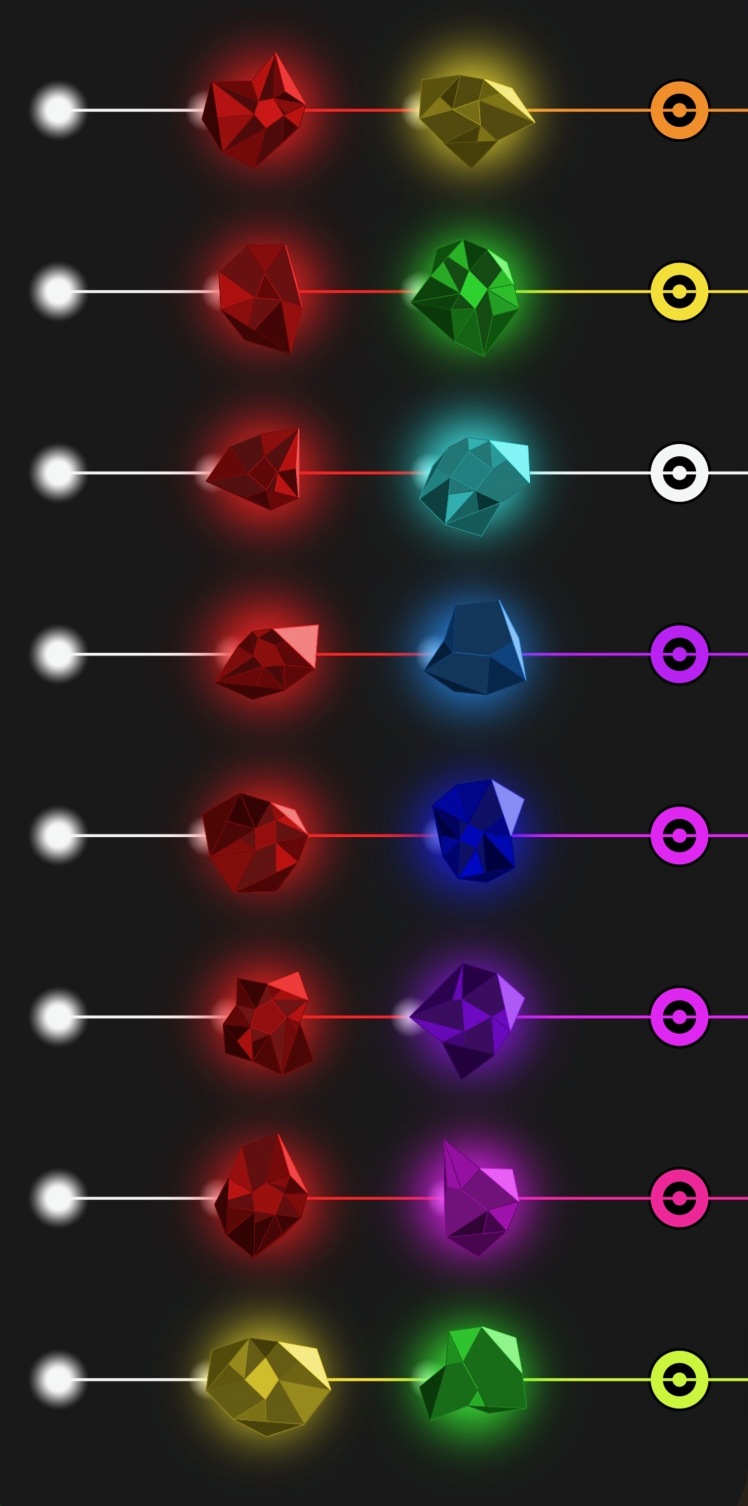
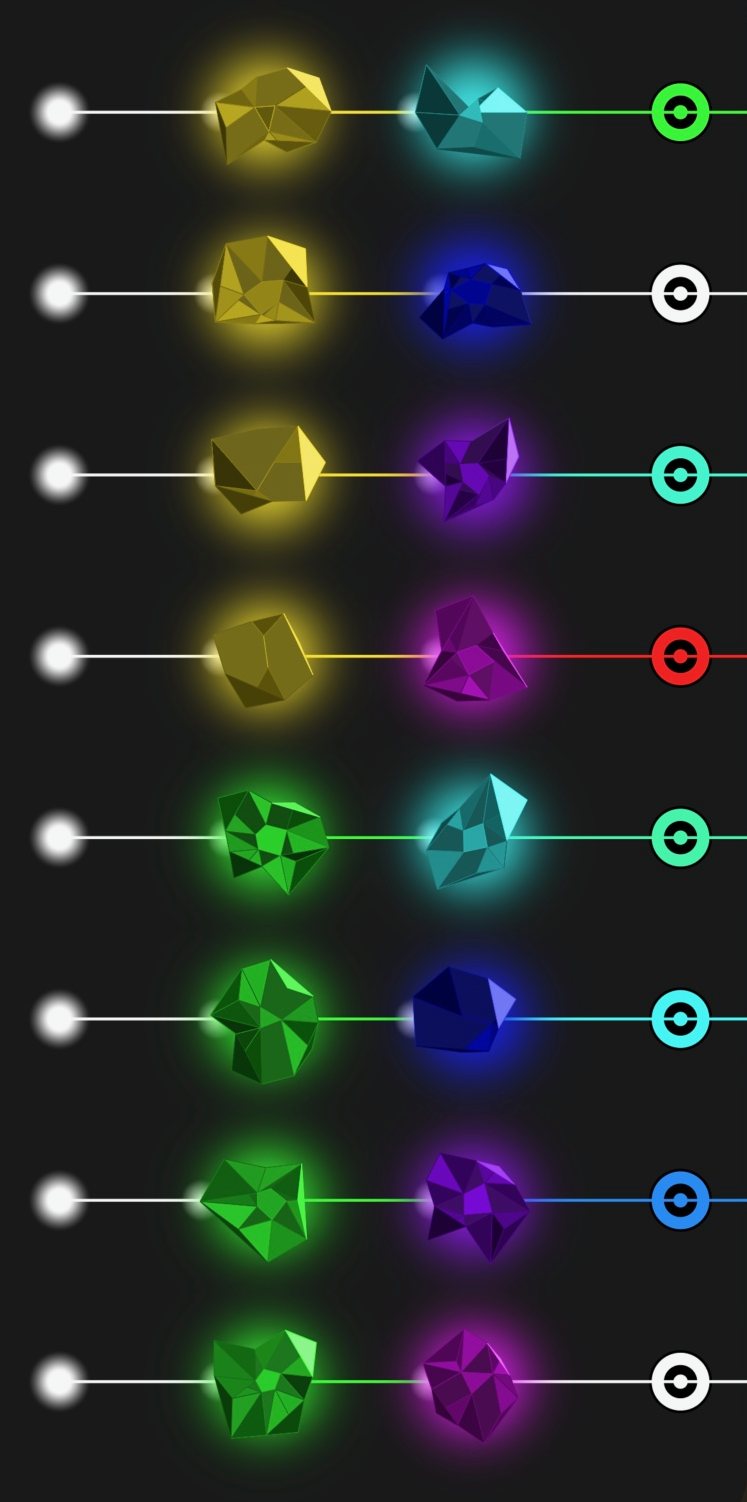
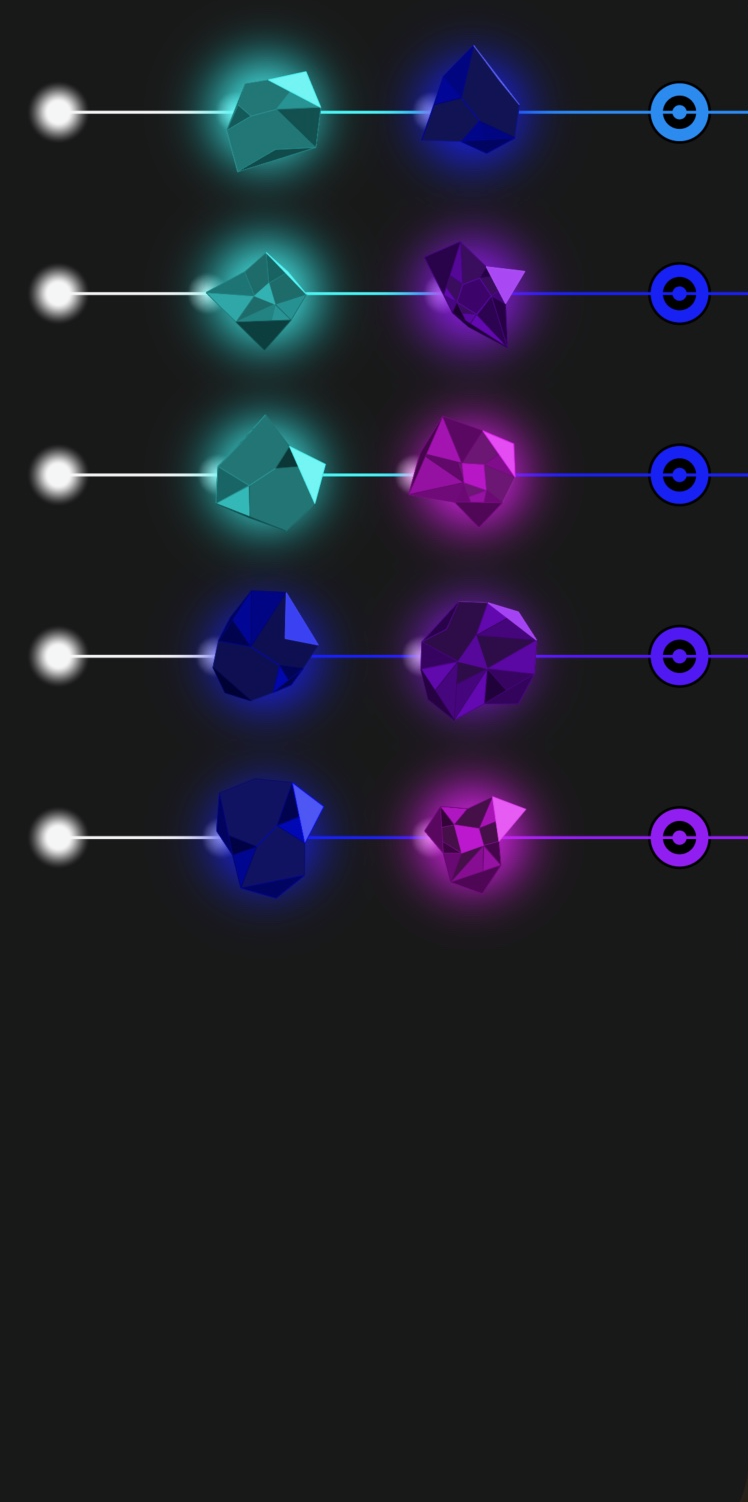
10.) Beam Color Mixing
Sometimes you will need to create a beam of a new color. This is done by sending an existing
beam through a Chromastone. The color of the resulting beam will depend on its original color
and the color of the Chromastone it is sent through. Some of these combinations are easy to
understand and some are harder. For instance, sending a white beam through a red Stone will
turn the beam red. In fact, sending a white beam through any color Stone will turn the beam
the same color as that Stone. Chromabeam often follows the rules of light, for
example, mixing red and green will become yellow and mixing red, green, and blue will become
white. But this is not always true. Below, you will find a chart indicating how colors are mixed
in Chromabeam. Note that some of the produced shades appear very similar but are slightly
different such as Red and Purple creating Magenta vs Red and Magenta creating Pink.
Good Luck!